IoT Hardware That Brings Your Software to Life: NetRelay
100% local management, with no cloud requiredPoE-Enabled Local Network Automation Device — Home Assistant-Compatible Relay
NetRelay combines Home Assistant-compatible relay control, MQTT integration, and industrial I/O so you can manage projects without depending on the cloud. Setup, ping watchdog, and automation scenarios run entirely on your local network.
What Is NetRelay?
A reliable and scalable IoT bridge between software and physical systems.
NetRelay is a programmable IoT and automation platform based on Wi-Fi and Ethernet, developed by Turkish engineers. It provides a strong bridge between software and physical systems, allowing sensors to be monitored, relays to be controlled and different automation scenarios to be easily implemented.
NetRelay's hardware and software infrastructure; It has been developed in line with many years of engineering experience, field applications and feedback from users. The product continues to be constantly developed to adapt to new needs and different usage scenarios.
It offers a flexible solution especially for developers who have software knowledge but want to combine their projects with a reliable and ready-to-use hardware infrastructure. NetRelay supports common communication methods such as HTTP, MQTT, WebSocket and TCP; It can be easily integrated into software developed with Python, Node.js, C#, PHP, Delphi and similar technologies.
Thanks to its Wi-Fi, Ethernet and PoE connection options, digital and analog inputs, relay outputs and expansion ports, NetRelay; It can be used in many different areas such as industrial automation, smart agriculture, energy management, access control, server room monitoring, building automation and remote device management.
The ability to run on the local network without requiring a cloud connection helps keep data under control, create automation scenarios that are not affected by internet outages, and develop more independent systems.
In short, NetRelay connects your software with real-world devices, sensors and automation systems; It is an extensible, flexible and powerful IoT platform.
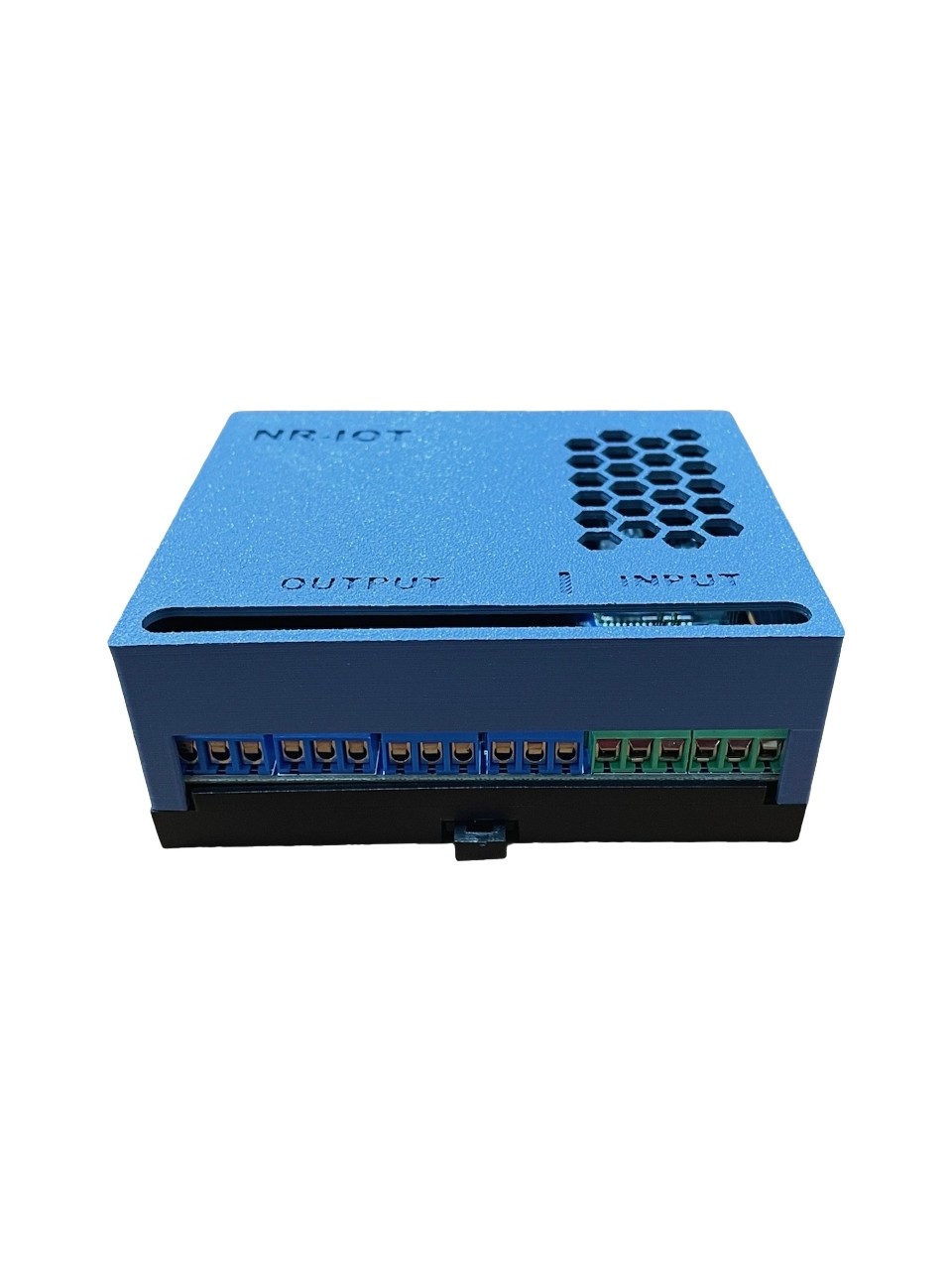
NetRelay box and hardware view
Examine the rail-mounted NetRelay IoT box from different angles.




Reliable automation in every field
Process data from sensors, trigger relays, and manage all your IoT scenarios — locally — from a single board.
NetRelay IoT Development Board
It adds value to your projects with 4 digital inputs, 4 250V 10A relay outputs and 18 expansion ports including I2C and SPI. You can expand timing and measurement capabilities with additional DS3231 RTC and external analog sensor / Micro SD modules.
- DS3231 RTC with additional module — time tracking without internet
- Analog temperature, light, pressure, humidity and soil sensors with external module
- Relay control, SMS and email triggering based on sensor data
Intelligent Event and Time Management
With the event configuration panel, you can set conditions and create workflows based on time or environmental data. Lighting, access control and energy management are automated thanks to sunrise/sunset triggers and custom timers.
- Triggering opposing relays by sharing sensor data between two boards
- Automatic action for systems that remain offline with Ping Watchdog
- Remotely monitor the status of scenarios with e-mail reports
Flexible Developer Experience
Thanks to the API compatible with Python, Node.js, Delphi, VB.NET, PHP and more, you can access all on-board I/O resources and manage relays programmatically. If you want, you can use the card as a developer card with custom firmware.
- Two-way communication with HTTP GET/POST, MQTT integration and Socket connections
- Instant control of relays via WebSocket with Remote Mode
- Scenario extension with HTTP commands from external devices
Power
Three flexible power options
The device can be used with 7–28V DC, a PoE adapter, or a PoE switch.
7–28V DC
DC jack input
PoE Adapter
802.3af/at
PoE Switch
802.3af/at
First boot · Wi-Fi AP Mode
Broadcasts as an access point for 15 minutes
On first boot, the device broadcasts in AP mode for 15 minutes. Connect with the SSID and password below to start setup.
mlteknoloji.com
mlteknoloji
Activated in minutes
Connect to the device with default network information, customize I/O names and define your scenarios from the web interface.
192.168.1.50
admin
mltek
Developer Notes
- Customize I/O names in the default web interface and enable event-based triggers.
- Monitor up to four IP addresses with Ping Watchdog and automatically handle system outages.
- Track time without an internet connection using the optional DS3231 RTC; measure temperature, light, pressure, humidity, and soil conditions with an external analog module; and record logs on Micro SD.
Industrial grade infrastructure
NetRelay IoT card; It offers an expandable control platform with multi-protocol communication, rich sensor inputs and flexible software infrastructure.
Hardware Components
Links
- 4 analog inputs with switched amplified gain
- 2 external ports for I2C, 1 SPI port, 1 UART (TTL) serial port
- Additional RS485 communication port and built-in 18 expansion ports
- 802.3af/at PoE supply and 7-28V DC jack input
Sensor and Relay Support
- 4 digital inputs (status monitor, PIR, door/window sensors)
- 250V / 10A switching with 4 relay outputs (NZ, NO, C)
- Supply voltage and temperature sensors for card status monitoring
Additional / External Modules
- DS3231 RTC with additional module — time tracking without internet
- Analog temperature, light, pressure, humidity and soil sensors with external module
- Local log and data storage with Micro SD module
Wireless and Interfaces
- Wi-Fi AP / Wi-Fi Client modes
- Turkish and English web interface
- Easy installation in the field with rail type mounting
Software Capabilities
Software Features
- Modern JavaScript-based web interface and customizable I/O names
- Advanced event handling and two conditional triggers
- HTTP Client, MQTT, WebSocket ve TCP server/client entegrasyonu
- Built-in SMS and e-mail sending, automatic update via NTP
Developer Integrations
- Access with Python, Node.js, VB, C#, C++, PHP, ASP and Delphi
- Customizable scenarios with HTTP commands from external devices
- Telemetry and sensor data collection with MQTT
- Watchdog support and optional function development
End-to-end scenarios from field to headquarters
NetRelay IoT; It combines a wide range of usage areas, from factories to smart agriculture solutions, from server rooms to site management, in a single card.
Factory and Facility Automation
Centrally control all I/O resources in production monitoring, energy management and security scenarios.
Detailed scenario →License Plate Recognition and Parking
Recognize authorized license plates, perform barrier control, and record entry-exit data in real time.
Detailed scenario →Irrigation and Environmental Control
Create automatic irrigation and greenhouse scenarios based on soil moisture, wind and weather conditions.
Detailed scenario →Lighting and Site Management
Optimize park and site lighting with sunrise/sunset triggers.
Detailed scenario →Server Cabinet Monitoring
Turn on the fans when the temperature rises, trigger SMS or relay when the internet goes out.
Detailed scenario →Telemetry and Reporting
Keep logs with MicroSD, send data to central systems via MQTT or HTTP.
Detailed scenario →Park Garden Irrigation
The soil moisture sensor starts irrigation when it falls below a certain value or every other day at 20:00, and automatically turns it off after 30 minutes.
Lighting Saving
It reduces costs by turning on municipal and site lighting 20 minutes after sunset and turning it off 30 minutes before sunrise.
Greenhouse Safety
When the wind speed exceeds 20 km/h, it puts the greenhouse into automatic protection mode with its electrical closing system.
License Plate Recognition Integration
When the license plate recognition system detects the authorized license plate, it opens the barrier for 1 second (optional delay setting).
Server Cabinet Alarm
When the temperature inside the cabin exceeds the specified threshold, the fan is activated; Triggers the alarm relay and sends notification when the internet is interrupted.
Production Tracking
With the serial port barcode reader, it instantly transfers the product count to the center via the socket.
Integrate in minutes
Effortlessly connect your NetRelay card to your existing automation systems with HTTP, WebSocket and MQTT pins.
API Example 1 — Sensor Reading
Retrieve sensor and I/O status data from the card in JSON format via HTTP GET request.
GET http://192.168.1.50/ios{"nereye":"ios","sensorData":"10","ipAdresi":"192.168.1.50","hostname":"MLTEK1","cihazID":"1000","inp1":"0","inp2":"0","inp3":"0","inp4":"0","out1":"0","out2":"0","out3":"0","out4":"0","tarih":"2023-07-26 13:52:23","uptime":"0 gün,2 saat,59 dakika,48 saniye","memory":242496,"ctemp":29}API Example 2 — Relay Control
Activate the relay for a certain period of time and then return it to its previous state.
GET http://192.168.1.50/outk?out=1&durum=1&gecikme=2{"ipAdresi":"192.168.1.51","hostname":"MLTEK1","cihazID":"1001","inp1":"0","inp2":"0","inp3":"0","inp4":"0","out1":"0","out2":"1","out3":"1","out4":"0"}API Example 3 — WebSocket Remote
Turn relays on and off in real time via WebSocket.
WS ws://192.168.1.50:3000{"nereye":"outRemote1","out":"out1","durum":"1","remote_key":"ORTAK_SIFRE"}API Example 4 — Socket Server Synchronization
Manage the relay status by connecting the card to the socket server in client mode.
WS ws://192.168.1.50:3000{"nereye":"outespc","cihaz_id":"1001","out":"out1","out_value":1,"gecikme":0,"remote_key":"ORTAK_SIFRE"}Video
NetRelay video içerik alanı
quick answers
Quick answers to questions about NetRelay IoT. Contact us for more information.
Does NetRelay work with Home Assistant?
Yes. NetRelay can be used as a Home Assistant compatible relay with ESPHome kits and MQTT integration. It is integrated in the local network without the need for cloud.
Is external access required?
No. NetRelay is a local network automation device; The scenarios run within a LAN. External access is optional — 100% local control is possible without using the cloud.
How can I access the NetRelay IoT card?
The default IP is 192.168.1.50, username is admin and password is mltek. You can connect to the web interface from the browser.
How does Wi-Fi AP mode work on first boot?
On first boot, the device broadcasts in AP (access point) mode for 15 minutes. Connect with SSID: mlteknoloji.com and password: mlteknoloji to start configuration.
Which protocols are supported?
You can use many integrations simultaneously with HTTP GET/POST, MQTT, TCP, WebSocket and internal Socket Server options.
What is MQTT and what does it do?
MQTT is a lightweight messaging protocol that allows IoT devices to exchange data quickly and reliably with low network traffic. NetRelay can transmit sensor and input states to the central system via MQTT; By receiving relay commands, it can establish bi-directional automation with Home Assistant, Node-RED, SCADA or special software. It also provides remote monitoring and control for external connections from branches to the headquarters without opening the modem port.
How does the Watchdog feature work?
It automatically triggers the relays you specify for systems that go offline by monitoring a maximum of 4 IP addresses.
How can I save sensor data?
You can keep logs with the MicroSD module and send instant data to external systems via MQTT or HTTP.
How to keep time without internet?
With the additional DS3231 RTC module, time tracking is possible without internet or NTP. Timers and sunrise/sunset scenarios continue to run on local time.
Which analog sensors are connected?
Analog temperature, light, pressure, humidity and soil sensors can be connected with the external module. The values are used for threshold triggers and MQTT telemetry.
Can it be powered via PoE?
Yes. The device can be used with 7–28V DC, a PoE adapter, or a PoE switch. 802.3af/at PoE and DC jack input are supported.